
Security
Is Zapier safe for client data? Why I took it out of a payments app

· 5 min read
Is Zapier safe to use with sensitive client data?
For ordinary business data, Zapier is a fine way to prove an idea works fast. Once an app handles sensitive client data, every tool in the middle is one more company holding a copy. On a payments app we were building, I did a security review, pulled Zapier out because the app could do the job itself, and made sure every tool left had a data processing agreement behind it.
In February I got on our weekly call with a payments company we were building an application for. The owner and his team were there, my development team was there, and I had an update I wanted to give before anything else.
"I did a security review of the application," I told them. Part of that was going through every third-party service plugged into the app and asking what it touched.
The first thing on the list was Zapier. We'd used it early on to connect the app to the payments platform it runs on. It worked. And the app could now do that same job on its own, inside its own code. "So there's no need to connect proprietary information or sensitive data to Zapier." We took it off.
Why was Zapier in a payments app in the first place?
Because it's the fastest way to find out if an idea works before you spend real time coding it.
The developer leading the build said it on the call. We wanted to see if the integration with the payments platform was even possible before building it ourselves, and it's "ten times faster to get proof of concepts through Zapier and then replace the Zapier connection later with our own in-house code."
That's the right order. You prove the flow with a tool you can set up in an afternoon. Then, once you know the flow is staying, you bring it inside the app. The second step is the one people skip, because the first version keeps working and nobody goes back to it.
Is Zapier safe for client data?
For contact details and ordinary records, usually yes. For sensitive data, every extra tool is one more company that sees it, and Zapier's own terms rule some of it out.
Their terms say not to send bank account numbers, health information or government ID numbers through the service at all. A payments application is full of exactly that kind of information.
If you're building something new that touches this kind of data, I wrote about keeping compliance from swallowing a first version.
Even for data Zapier allows, think about what a middle tool does. Every run passes your client's information through another company's servers, and that company keeps a record of it so you can troubleshoot. Each one of those is a company your client never heard of, holding a copy of their details.
So the question I ask in a review is simple. Does this tool need to be here? If the app can do the job itself, the answer is no, and it comes out. The fewer of those middle tools you keep, the closer you get to one place your team works from.
What's a DPA, and which tools need one?
A data processing agreement spells out how another company handles your data. Any outside tool that stores or processes your clients' personal information should have one.
Someone on the client's team stopped us here. "What's DPA? Sorry."
I explained it as a mutual understanding of how data is handled between the companies. It's an agreement the payments company signs with each vendor. Nothing gets attached to the application itself.
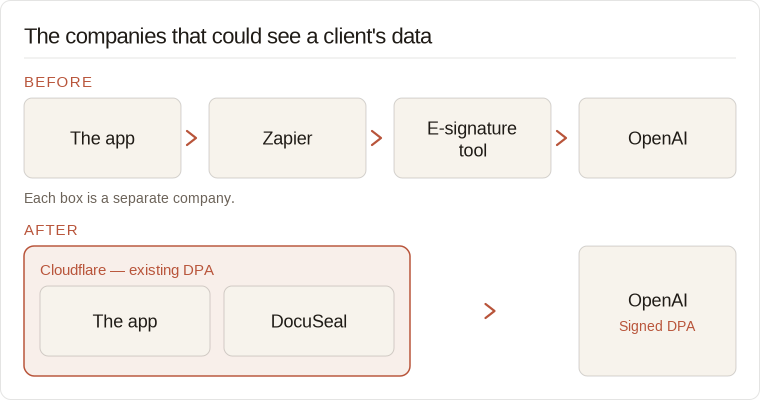
Then we went down the list. We already had one in place with OpenAI. That's also the starting point when you price a private ChatGPT for a firm. The payments platform the app is built on already stores all of this information as the core of what it does, so we agreed it didn't need a separate one.
The e-signature tool was the interesting one. The developer asked whether the contracts we send through it include bank account information. They do. I wanted to make sure that whatever third parties we're working with, we get the DPAs we need. The owner pulled up the vendor's DPA page and clicked the button to sign it. It took him to a page that said: "The page you're looking for is no longer available."
How do you cut down the number of companies holding your client data?
Run the tools you need on infrastructure you already have an agreement with, so the number of outside companies stays small.
We'd already been talking about swapping the e-signature tool for DocuSeal, an open-source version you can host yourself. The developer asked where we'd run it. A cheap server somewhere?
The app already runs on Cloudflare. "So if we have a DPA with Cloudflare, and we're already processing data with them, and we're self-hosting DocuSeal on Cloudflare, that's the only third party between us at that point."
The owner checked while we talked. Cloudflare's DPA is already built into their standard agreement. So the plan was set. Host the signing tool ourselves on Cloudflare, and the contracts with bank details stay inside an agreement the company already has.
There was one more on the list. The owner has a sister company the app will exchange data with. The developer pointed out that because it's all the same owners, they didn't strictly need one. His answer: "We'll get it in place anyway."
That's the kind of client you want on the other side of a security review. They didn't argue about the paperwork. They asked what it was, understood why it mattered, and got it done.
"There's no need to connect proprietary information or sensitive data to Zapier."
What this means for your business
You probably have more companies holding your clients' data than you think. Your CRM, your forms, your e-signature tool, your email platform, the AI tool somebody on your team pastes notes into, and every automation stitching them together.
Sit down and write the list. For each tool, answer three things.
What client information goes through it. Names and emails are one thing. Bank details, health information and ID numbers are another.
Whether you have a data processing agreement with that company. Most big vendors have one you can sign online, as long as the button works.
Whether the job could happen inside a system you already trust. If your CRM can send the follow-up itself, the automation tool in the middle doesn't need to see it.
Then bring as much of it as you can into one place your team works from. Fewer copies of your clients' data means fewer companies to vet, fewer agreements to keep track of, and a much shorter answer when a client asks where their information lives.