
Coaching
Which YouTube videos make money? How we put revenue next to each one

· 5 min read
How do you see which YouTube videos actually make money?
Give every video its own booking link, so each booked call carries the video it came from. Then connect the payment side, match each payment to the booking it came from on name and email, and put the money next to each video. Bookings are the halfway point. Revenue by video is what tells you which content is actually carrying the business.
Right before Christmas last year I got on a call with a client team I'd been building a tracking dashboard for. One of them coaches people on long-form YouTube content, and he'd been using the thing day to day for about three months.
He told me what it had changed for him. Seeing how many calls each video booked had shaped what he made next. He'd looked at which videos booked the most calls and come to his own conclusions about what kind of video works. Then he said that if he's coaching somebody on content that's supposed to book calls, and nobody can see where those calls come from, "it's just guessing."
That's the whole reason the thing exists, so it was good to hear. I also knew it was only half done.
What he was looking at
The setup is simple. Every video gets its own link. When somebody books a call through that link, the booking carries the video with it. The dashboard has a pie chart of calls booked per video, so you can see which one is pulling its weight.
He looked at that pie chart a lot.
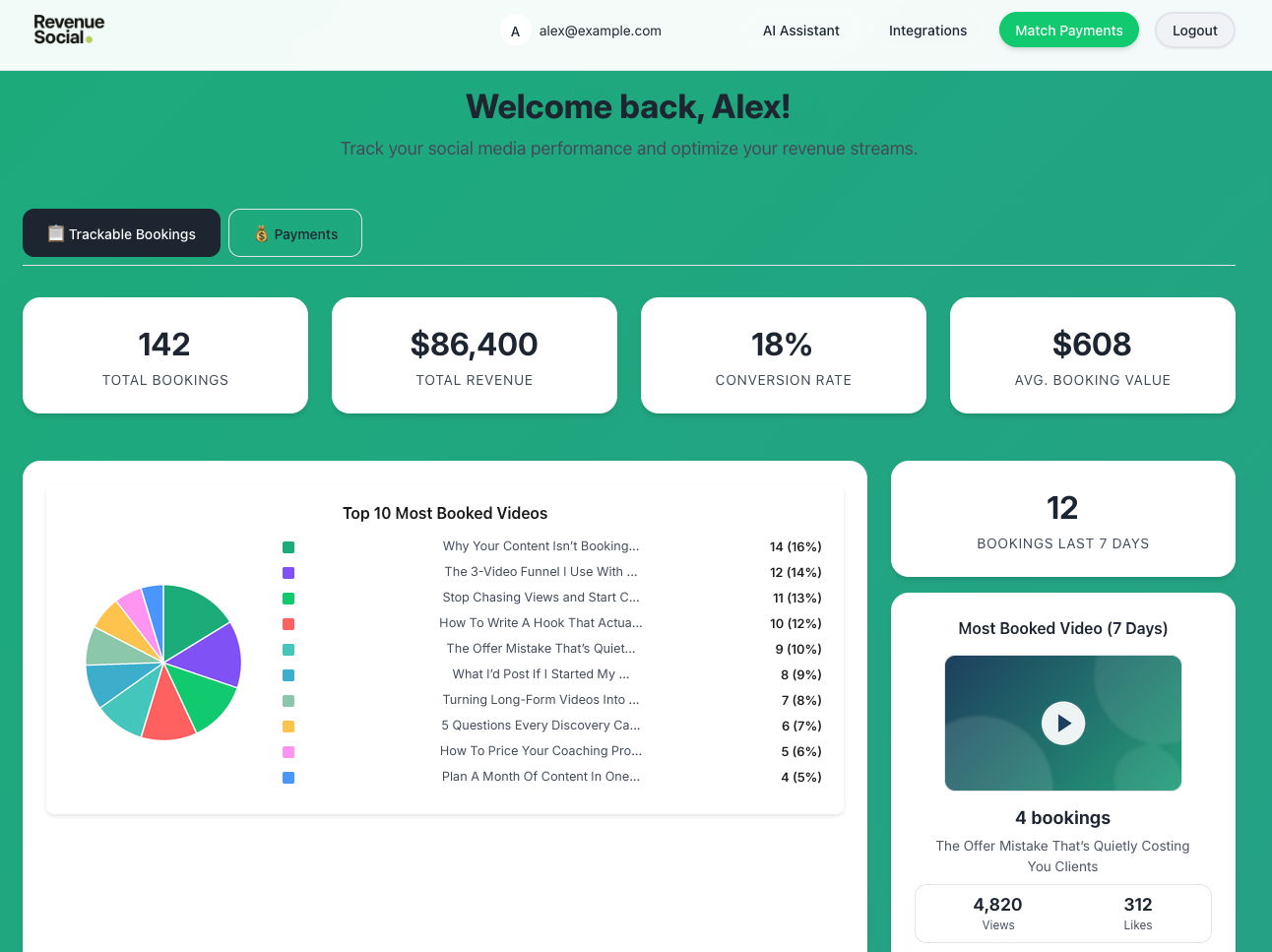
There's a second layer under it: the person's name, where they came from, and how much they ended up paying. On that call, that layer still wasn't working. The revenue wasn't coming in yet because the payment side wasn't connected. They'd had more than one payment processor in play, and they had just settled which ones they were actually using, which meant I could finally finish it.
Bookings are the halfway point
Here's how I put it on the call: it's helpful to see the clicks, but the real value is the conversion. The money, by video.
A booked call is a good sign. It still has to close. Here's a made-up example to show what I mean. Say one video books twenty calls and most of them are people who were never going to buy. Another books six and four of them sign. If all you can see is bookings, you go make more of the first kind.
What the team wanted was plain. Pull up one video and say "we made this much from that one," and know what came in second.
Getting it all in one place
Tracking links are old technology. The way we used them is what's different. Each link is tied to a specific video, and it can also be tied to a specific offer. So the dashboard can split revenue by channel, or by offer, or both. If you're running more than one offer, that's how you find out which one is actually carrying the business.
Under all of it is the thing I end up saying to almost every business I work with. The goal is to get the data centralized. The booking lives in the CRM, the payment lives in the processor, the content lives on YouTube. Until somebody connects those, you're reading three screens and filling in the gaps yourself.
Now forward, or go back
There was one decision on that call I liked. They'd been tracking bookings since the summer, so there were months of bookings with no revenue attached. I laid out two ways to do it: get the payment side running and track from now forward, or also go back and fill in revenue for the old bookings.
One of their team called it. Do now forward, get it working the way we want, and look at the old data after.
That was the right call. Backfilling months of bookings is its own project, and it doesn't help anybody until the live version works. Get a couple weeks of real revenue on the board first. Then decide whether the history is worth the effort.
Why I wanted to finish this one
I've built a lot of tools for business owners. Some of them are one and done. I hand it off and that's it. Others clearly have more in them, and those are the ones I like to stay with.
What I don't like is handing something off and watching it flop. This coach was planning to use his own numbers in his videos, as proof of what happens when you set this up. A pie chart of bookings wasn't going to carry that. He needed a dollar figure next to each video.
The money is next to the video now
So I finished it. The revenue layer shipped. It pulls payments from Stripe, NMI and Whop, matches each payment to the booking it came from, and puts the money right next to the video that started it.
The fiddly part was the matching. The name on a booking form and the name on a payment don't always line up. Somebody books as Mike and pays as Michael, or uses a different email at checkout. So it matches on name and email, allows for the near misses, and anything it isn't sure about can be checked by hand.
I'm not going to share his numbers here. They're his, and he's the one who gets to put them in a video.
It also didn't stay a one-off. The same idea, one link per video and the money next to each one, is what I turned into Revenue Social.
If you run a coaching program and you make content to book calls, think about what you're looking at when you decide what to make next. If it's views, or even bookings, you're ahead of most people. Bookings are the halfway point. The rest of it is putting the money next to each video.