
Testing
User acceptance testing first: why the client's staff test the app before I write automated tests

· 6 min read
Should you build automated tests before real users try a new app?
Not yet. Have the people who'll use the app every day try it first, and fix what confuses them. Automated tests come right before rollout, on the flows the business has already signed off on. If you build the test suite first and the client changes how the flow works, you've paid to test something that's about to change.
In January I got brought onto a build that was already moving. It was a merchant application app for a payments company. Merchants fill out an application, the company's admins review it, and the files get sent into the CRM the company uses to manage its merchants.
My partner on the build, who'd brought me in, said it plainly: "Every time I go through the app, we find a new bug."
That's the moment a lot of builders reach for a full test suite. I asked if that's what he meant, a general test suite, and then said what I was thinking: that's a good amount of work.
Why not write automated tests first?
Because automated tests lock in how the app works today, and until the client's people have used it, you don't know if today's version is the right one.
Here's the problem with doing it first. A test suite checks that the app does what you wrote down. If the business owner's team sits down with it and says the order of the steps is wrong, or a screen should work differently, every test written against the old flow is now wrong too. I put it this way on the call: "If they end up saying, I don't like the way this works, and we build a whole test suite, it's wasting time and money."
What does user acceptance testing catch that automated tests don't?
User acceptance testing catches whether the app makes sense to the people doing the work, which is the one thing a test you wrote yourself can't tell you.
The client had already offered. He has employees, and we'd done a round like this with them before. As my partner relayed it, the owner's answer was: "Let me know when it's ready to test again, and I'll have them go through and try to do things, and then we'll let you know what's confusing or doesn't work."
That's the test I want first. His staff know what a real merchant application looks like and where it gets stuck. They'll notice that the Submit Application button on the merchant side is huge and looks goofy. They'll find that an admin who clicks into Settings can't get back to the dashboard or the merchant list. Those were two of the bugs on our list that morning, and both are the kind you find by using the thing.
"You need to validate the business from a business perspective, how well it functions," I said. "So I would probably prioritize that first. And if they find bugs, we fix that here and there."
When do automated tests earn their keep?
Automated tests earn their keep at rollout, on the flows the business has already approved, so nobody has to click through every button by hand again.
I'm not against them. I said in the same breath that when you're ready to roll out, you should have test suites, because clicking every button by hand isn't a job for a person. "No one's clicking through and making sure buttons work. That should be an automated thing." Once the client's team says the flow is right, the tests protect it. Every new change gets checked against a flow you know people want.
The order is the whole point. Here's how I sequence it.
- 1.Fix the bugs you already know about, like a button that's the wrong size or a page you can't navigate out of.
- 2.Clear anything that blocks real data. On this build, that meant confirming the AI vendor's data agreement was signed before the app read real applications, and starting the security compliance policies with the client's team.
- 3.Hand it to the client's staff. Collect what's confusing and what's broken.
- 4.Fix and repeat until the business says the flow is right.
- 5.Then write the automated tests, on the flows they signed off on, before rollout.
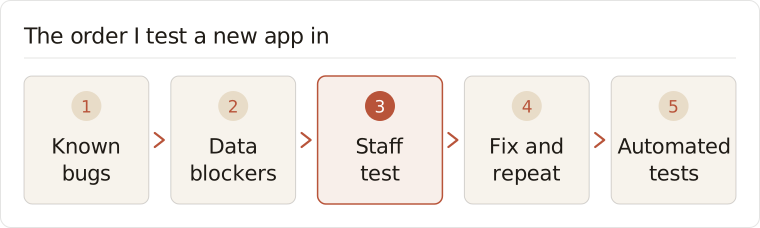
Let the people who do the work try it first. Fix what confuses them. Then automate the tests on the version they said yes to.
What do you do with the parts of a build you didn't set up?
You audit them before you decide anything, because you can't test or replace something when you don't know what it does.
The same call had another one of these. The app was leaning on Zapier automations that created leads in the merchant CRM and sent uploaded files over. Getting off Zapier went near the top of the list, and my partner on the build asked whether we even needed an integration platform like Zapier or Make, or if the app itself could do it.
"I have zero idea what the automations are doing," I said, "so let's do a preliminary audit and go, okay, does this make sense? And then we'll decide what to do there." We all leaned toward the app handling it. But nobody was going to rip anything out before we'd looked at every automation and what it touched.
After the audit, we moved off Zapier, and the app handles those steps itself now.
It's the same instinct as the testing order. Find out what's true before you build around it. It's also why I kept HIPAA from swallowing a healthcare founder's first version: get a working version in front of real people first.
What this means for your business
If someone is building you an app, a portal or a CRM setup, ask them one question: when do my people get to use it? If the answer is "after it's finished and tested," push for earlier. Your team will find the confusing screens in an afternoon. A test suite won't find them at all, because it only checks what the builder already believed.
Here's something you can do this week. Pick two or three people who'll use the new system every day. Give them one real task to do in it, start to finish, like submitting a real application or moving a real client to the next stage. Ask them to write down every spot where they stopped, guessed or got stuck. That list is your first round of fixes. Automated checks come later, once the flow is the one your team wants. They're the same kind of plain pass-or-fail check I put after every AI step.
This is why Skaiward builds around your client data living in one place. When your people and your AI agents work from the same records, the people testing the app are looking at the real thing, and what they find goes straight back into the build.